


This is a free printable goal tracker template for keeping every goal in one place and seeing, month by month, whether you are actually moving forward. It is a seven-page PDF: goals at a glance with progress bars, a milestone map for your biggest goal, a monthly goal tracker, weekly check-ins, and a year at a glance page. There is also a completed example showing a real year, five months in.
Download the free goal tracker template (PDF) | See the filled-in example (PDF)
No email required, and it prints cleanly in black and white. Below we walk through each page, explain the difference between tracking results and tracking actions, and show how to keep a tracker going after the first few weeks, which is where most of them die.
What is in the free goal tracker template
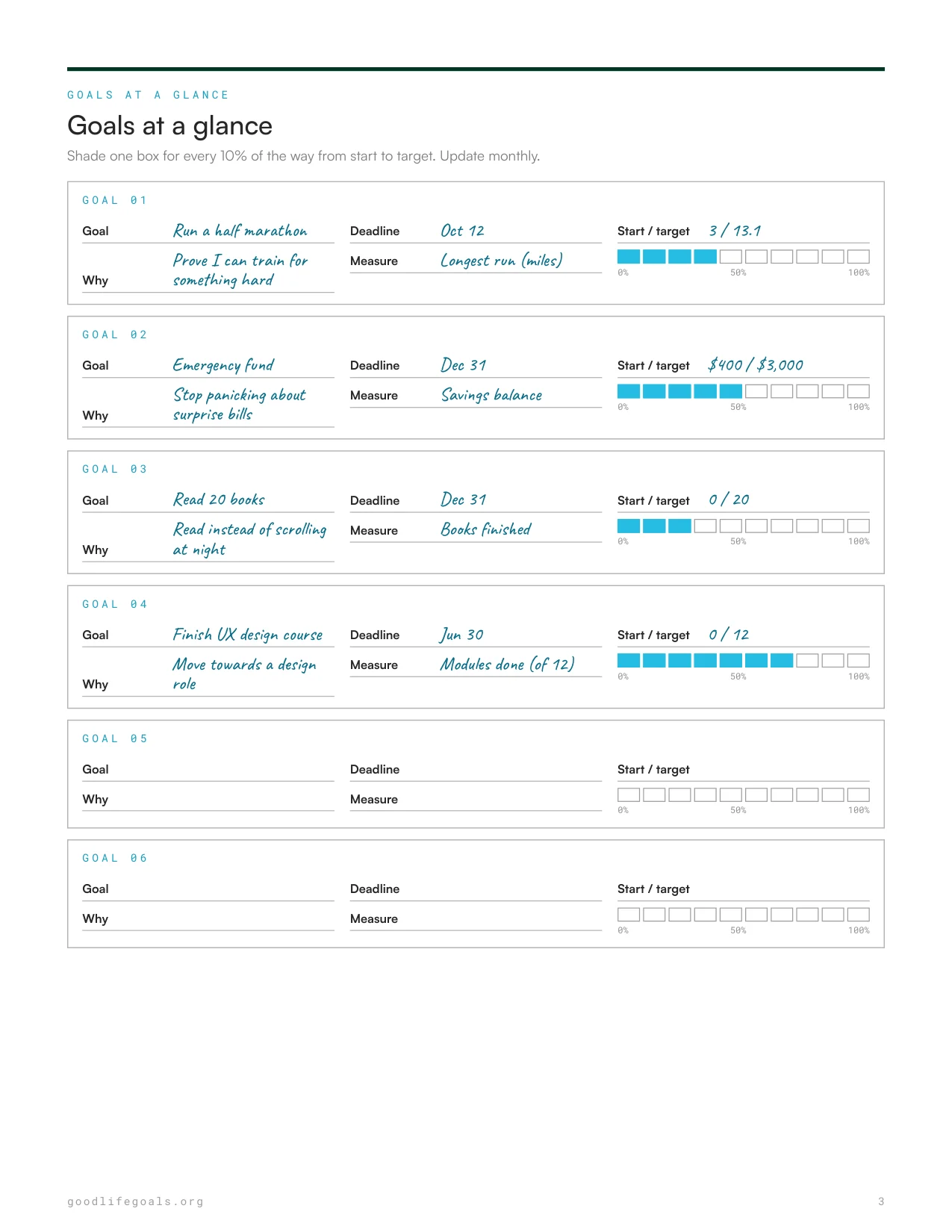
- Goals at a glance (page 3). Up to six goals, each with a why, a deadline, a measure, a start and target number, and a ten-box progress bar.
- Milestone map (page 4). One big goal broken into ten milestones with target dates and a "done on" column. You fill it from the top down, starting with the goal and working backwards.
- Monthly goal tracker (page 5). This month's target for each goal, your number for each week, the actual result, and a simple hit, partial, or miss.
- Weekly check-in (page 6). Four short check-ins per page: your numbers, one win, what got in the way, and one action for next week.
- Year at a glance (page 7). Every goal's progress, month by month, on a single page.
Print pages 3, 4, and 7 once for the year. Print a fresh copy of pages 5 and 6 each month.
Track the result and the actions
Most goal trackers only record the result: dollars saved, pounds lost, books finished. The trouble is that results move slowly and unevenly. A flat week on the scale or a month with no savings growth feels like failure, even when you did everything right.
This template tracks two things for every goal. The result measure is the outcome you want, like a savings balance or the length of your longest run. The action measure is the work you control each week, like transfers made or training runs completed. When the result stalls but the actions are on track, you keep going. When both stall, you change the plan. That one distinction stops most people from quitting at the exact moment they are about to see progress.
If a goal has no natural number, count the actions instead: sessions done, pages written, calls made, applications sent. Anything you can count, you can track.
Goal tracker vs habit tracker vs to-do list
These three tools get mixed up constantly, and using the wrong one is a common reason tracking feels pointless.
| Tool | What it tracks | How often | Best for |
|---|---|---|---|
| Goal tracker | Progress towards a specific outcome with a deadline | Weekly and monthly | Big goals that take months: a race, a savings target, a course, a launch |
| Habit tracker | Whether you did a repeated behaviour today | Daily | The small daily actions that feed a goal, like a walk or 20 pages of reading |
| To-do list | One-off tasks | Daily | Individual steps, like "book the race" or "open the savings account" |
They work best together. The goal tracker holds the destination, the habit tracker holds the daily behaviours, and your to-do list holds this week's next steps.
How to set up your goal tracker in 20 minutes
- Write no more than four goals. The page has six slots because life is messy, not because six is a good number. If you are not sure which goals matter most, score your life with our wheel of life template first.
- Give each goal a measure, a start, and a target. "Get fit" becomes "longest run: 3 miles to 13.1". If your goals are still vague, our guide to writing SMART goals will sharpen them.
- Map your biggest goal. On the milestone page, write the goal as step 10, then work backwards to step 1. Give each milestone a target date.
- Set this month's targets. On the monthly page, decide what progress looks like by the end of the month for each goal. Keep it modest.
- Book your weekly check-in. Pick a time, such as Sunday evening, and put it in your calendar. The tracker only works if you open it.
Choose your approach by the problem you have
- "I start strong and stop tracking after three weeks." You are probably tracking daily. Switch to the weekly check-in only. Ten minutes once a week is far easier to keep than a daily log.
- "I have one huge goal and it feels impossible." Start with the milestone map. Ten steps with dates turn one scary goal into ten achievable ones. For a full structure, pair it with the 12-Week Goal System.
- "I have too many goals." Fill in all six slots, then cross out two. Seeing them side by side makes it obvious which ones you do not really care about.
- "I track, but nothing changes." Look at your monthly hits and misses. Two misses in a row on the same goal means the target is too big or the plan is wrong. Shrink it or change the approach. Trying harder rarely fixes it.
- "I prefer an app." That works too. Our roundup of the best goal setting apps covers the options. Many people still keep a paper year at a glance page on the wall, because an app does not remind you by just sitting there.
A worked example
The filled-in example follows one person five months into a year with four goals: run a half marathon by October 12, build a $3,000 emergency fund by December 31, read 20 books this year, and finish a 12-module UX design course by June 30.
By the end of May the progress bars read 40% for the half marathon (longest run up from 3 miles to 7), 50% for the emergency fund, 30% for reading (6 books), and 70% for the course (9 of 12 modules; the bar rounds down to the last full 10%). The milestone map shows six of ten running milestones done, all within a day or two of their target dates.
The monthly page for May shows three hits and one partial. Savings hit their target thanks to an automatic transfer every Friday. Reading fell short, and the notes say why: it had no set time. The fix on the weekly check-in is specific: phone out of the bedroom, book on the pillow. On the year at a glance page, the mid-year note is honest too: reading is behind, and dropping the target to 15 books is fine.
Common goal tracking mistakes
- Tracking only the result. Results lag behind effort. Track the actions too, so a slow month does not convince you to quit.
- Measuring too often. Weighing yourself or checking savings daily creates noise. Weekly numbers and a monthly review show the real trend.
- Never changing the target. A goal set in January was set with January's information. Adjusting a target at mid-year is planning, not failure.
- Keeping dead goals on the page. If a goal no longer matters, cross it out and write why. A tracker full of quietly abandoned goals teaches you to ignore the tracker.
Does tracking your goals actually help?
Yes, and this is one of the better-supported ideas in goal research. A 2016 meta-analysis by Benjamin Harkin and colleagues, published in Psychological Bulletin, pooled more than 100 experimental studies and found that monitoring progress towards a goal made people more likely to reach it. The effect was stronger when progress was physically recorded, such as written down, or shared with someone else.
That is why this template is on paper and why the weekly check-in asks you to write your numbers down, not just think about them. If you want the sharing part too, show your year at a glance page to a friend each month. Our guide on how to hold yourself accountable has more ways to build that in.
What we left out, and why
- A daily goal log. Daily logging is where most goal trackers get abandoned. Daily behaviours belong on a habit tracker. This tracker is weekly on purpose.
- Dated pages. Calendars go stale the moment you print them. Every page is undated, so you can start in any month.
- Space for ten or more goals. More slots invite more goals, and more goals means less progress on each. Six is already generous.
- Motivational quotes. Your own "why" line does more than a stranger's quote. Every goal card has one.
Where to go next
A tracker shows you whether a plan is working. To build the plan for a single goal in detail, use our goal setting worksheet. For a monthly planning rhythm that fits this tracker, see our monthly goal setting system.
If you want a visual reminder of the bigger picture, our free vision board template pairs well with it: the board shows where you are heading, and the tracker shows how far you have come.
Frequently Asked Questions
Is this goal tracker template really free?
Yes. The PDF is free to download and print for personal use, with no email sign-up. Print as many monthly and weekly pages as you need.
How many goals should I track at once?
Four or fewer works best for most people. The template has six slots for flexibility, but every extra goal competes for the same time and energy. If in doubt, track fewer goals more closely.
How often should I update my goal tracker?
Weekly for your numbers and monthly for your progress bars and year at a glance page. Daily updates are better suited to a habit tracker, and they are the main reason people abandon goal trackers early.
What is the difference between a goal tracker and a habit tracker?
A goal tracker follows progress towards an outcome with a deadline, like saving $3,000 by December. A habit tracker records whether you did a repeated behaviour each day, like a daily walk. Most people get the best results using both.
Can I use this as a monthly goal tracker?
Yes. Page 5 is a standalone monthly goal tracker with a target, weekly numbers, and a result for each goal. Print a new copy each month and use the other pages when you want the bigger picture.